前言
很多人问,为什么谷歌云的SSH连接不上去?那是因为谷歌云你若是想使用第三方的SSH工具登录的话,需要进行下面的设置
设置root密码
1.先选择从浏览器打开ssh连接服务器
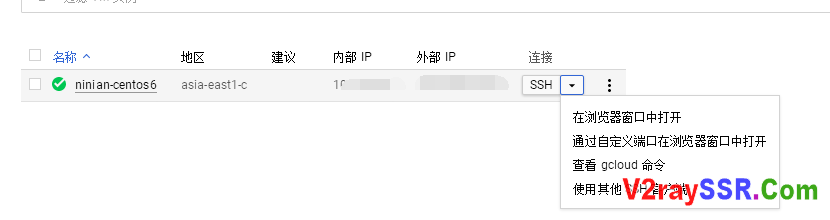
2.切换到root账号,输入代码
- sudo -i
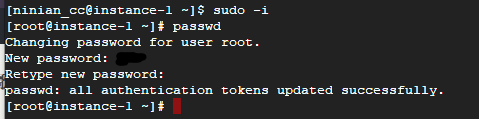
3.设置root密码
- passwd
然后会要求输入新密码,然后再重复一次密码,输入密码的时候不会显示出来,所以直接输入密码,然后回车,再然后重复输入密码回车
开启SSH权限
CentOS和Debian通用,输入以下两条命令
- sed -i 's/PermitRootLogin no/PermitRootLogin yes/g' /etc/ssh/sshd_config
- sed -i 's/PasswordAuthentication no/PasswordAuthentication yes/g' /etc/ssh/sshd_config
Ubuntu系统,输入以下两条命令
- sed -i 's/#PermitRootLogin prohibit-password/PermitRootLogin yes/g' /etc/ssh/sshd_config
- sed -i 's/PasswordAuthentication no/PasswordAuthentication yes/g' /etc/ssh/sshd_config
重启服务器
- reboot

评论
发表评论